GAS ENGINEER SOFTWARE

The whole working day.
One connected platform.

Bookings, customer records, professional paperwork and technical tools — designed around the way UK gas and heating engineers work.

01 / MY BUSINESS

Less paperwork.
More control.

The job doesn’t finish at the boiler.

Keep the customer, the job and the money together. Create branded invoices, capture expenses and see what’s outstanding.

  • Professional invoices with your own business details
  • Photo receipts and expense records in one place
  • Customer, job and income tracking
  • Bookings, diary and customer email updates when enabled
  • Customisable invoice and certificate branding
Explore My Business
MY BUSINESS

The work.
And what comes after.

  1. 01

    Keep the job together

    Customers, appliances and job records

  2. 02

    Make it yours

    Invoices and supported certificates with your branding

  3. 03

    Know where you stand

    Record payments and track outstanding balances

  4. 04

    Keep the costs in view

    Photo receipts and expense records

Business workflow overview · not an app screen

BOOKINGS & DIARY

Your next visit.
Already organised.

Your diary. Your customers. Your business name.

Plan visits in one place, review customer requests and keep control of your working day. Accept, reschedule or cancel appointments from your GasTrack diary.

  • Day and week views, with working hours and time between visits.
  • A shareable customer request link, once enabled. You accept each booking.
  • Confirmation, change and cancellation emails, plus a reminder when enabled.
  • Choose a reminder 24 or 48 hours before the visit.

Customer-facing bookings and emails show your business name. Email replies go to your account email address. Customer links and emails require setup and must be enabled; reminders depend on when the appointment is booked.

Ask about bookings
FROM REQUEST TO VISIT

Your business.
A personal welcome.

  1. 01

    Share your booking link

    Let customers request a planned visit under your business name.

  2. 02

    Review and accept

    Check the job and travel time before confirming the appointment.

  3. 03

    Keep customers informed

    Enabled emails confirm the details and remind customers about eligible upcoming visits.

Booking workflow overview

LUNAAI-ASSISTED DIAGNOSTICS

Every observation
has a place.

01 / Identify

Start with the appliance.

Select the appliance and available model information.

  • Appliance identity
  • Available model details
  • Relevant fault codes

Select a step to explore · workflow guide, not a live diagnosis

02 / MEET LUNA

Intelligent support.
Engineer in control.

Give your observations a clearer direction.

Bring the appliance, fault codes and your checks into one investigation. Review Luna’s reasoning, then record your own assessment.

You carry out the checks and make the final assessment. AI does not guarantee a diagnosis or certify safety. Always use the manufacturer instructions.
Explore AI-assisted diagnostics

03 / THE PROFESSIONAL TOOLKIT

Built around
your working day.

Technical support and business records.
In one connected place.

CERTIFICATES & RECORDS

Professional records. Less paperwork.

Create branded landlord gas safety records and supported service documents from the work you record.

Records are completed by the engineer. Software does not certify competence or appliance safety.

Explore certificates

SERVICE MODE

Structured servicing, start to finish.

Keep measurements, checks and completed work together, with manufacturer references where available.

Reference and procedure coverage varies by boiler model. Always consult the current manufacturer instructions.

Explore Service Mode
REGULATION ASSISTANT

Technical guidance, when it matters.

Find relevant gas safety guidance and manufacturer information in the context of the job.

Use current regulations, applicable industry procedures and professional judgement.

Explore guidance

PARTSFINDER & BOILER INFORMATION

The right starting point.
The exact appliance.

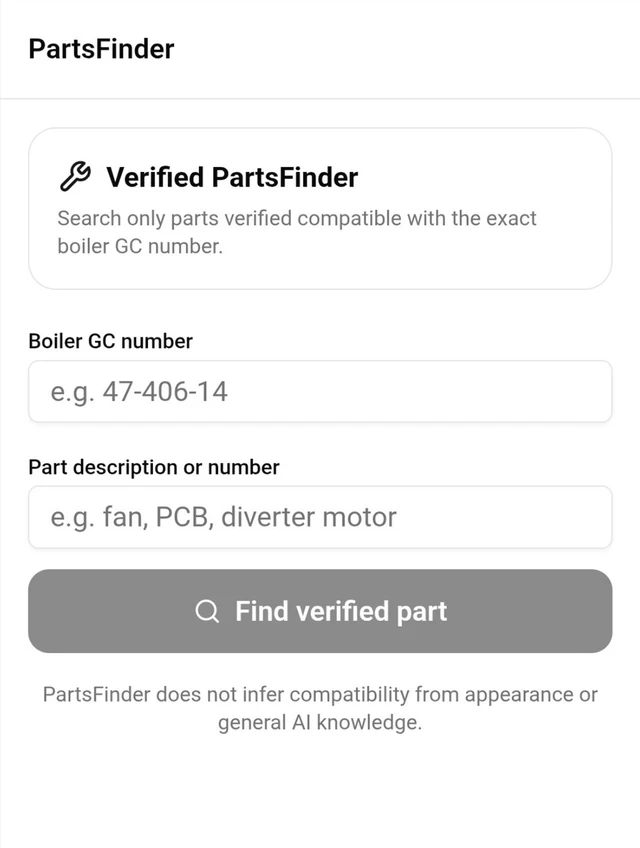
Start with the boiler’s GC number. Search by part description or number, then review the available mapping and its source.

  • 01
    Identify precisely

    Keep the appliance identity at the centre of the search.

  • 02
    Review the evidence

    Use available reviewed mappings, with compatibility checked against the source.

  • 03
    Know the limits

    Coverage varies. An unverified match is not confirmed compatibility.

Explore PartsFinder
INSIDE GASTRACK / PARTSFINDER
GasTrack PartsFinder app capture with boiler GC number and part description search fields and the compatibility evidence notice
Saved app screen · search results depend on available coverage.

BUILT FOR THE WAY ENGINEERS WORK

From first job.
To final invoice.

01

Set up the job

Keep your customer, job and appliance information connected.

02

Do the work

Use the technical tools available for the appliance and record your findings.

03

Close the loop

Complete your records, prepare the invoice and track the business side.

Working where signal is limited?

Some diagnostic work can be saved on the device, and previously cached boiler information can be available offline. Online AI requests and server syncing require a connection. Availability depends on what has already been loaded and saved on that device; check its save status before leaving the job.

GASTRACK FOR ANDROID

Your engineering business.
One app.

From your first job of the day to your final invoice, GasTrack keeps your tools, records and business organised.

Available on Google Play

Get it on Google PlayDownload GasTrack on Google Play